定义用户类User的JavaBean,在登录成功的user2.jsp页面中使用JavaBean。
4.5.1 构建User的JavaBean
User.java文件:
package cn.cszyedu.po;
public class User {
private String userName;
private String userPwd;
private String eMail;
private String telephone;
private Integer loginTimes;
public User() {
super();
}
public User(String userName, String userPwd, String eMail,
String telephone, Integer loginTimes) {
super();
this.userName = userName;
this.userPwd = userPwd;
this.eMail = eMail;
this.telephone = telephone;
this.loginTimes = loginTimes;
}
public String getUserName() {
return userName;
}
public void setUserName(String userName) {
this.userName = userName;
}
public String getUserPwd() {
return userPwd;
}
public void setUserPwd(String userPwd) {
this.userPwd = userPwd;
}
public String geteMail() {
return eMail;
}
public void seteMail(String eMail) {
this.eMail = eMail;
}
public String getTelephone() {
return telephone;
}
public void setTelephone(String telephone) {
this.telephone = telephone;
}
public Integer getLoginTimes() {
return loginTimes;
}
public void setLoginTimes(Integer loginTimes) {
this.loginTimes = loginTimes;
}
@Override
public String toString() {
return "User [userName=" + userName + ", userPwd=" + userPwd
+ ", eMail=" + eMail + ", telephone=" + telephone
+ ", loginTimes=" + loginTimes + "]";
}
}
login.jsp文件和4.4中的一样。
login_action.jsp文件和4.4中的基本一致,只是将登录成功页面跳转到user2.jsp:
pageContext.foward("user2.jsp");
css/user.css和4.4中的一样。
4.5.2 使用JavaBean
jsp./user2.jsp文件:
<%@ page language="java" import="java.util.*" pageEncoding="UTF-8"%>
<!DOCTYPE HTML PUBLIC "-//W3C//DTD HTML 4.01 Transitional//EN">
<html>
<head>
<title>员工之窗</title>
<meta http-equiv="pragma" content="no-cache">
<meta http-equiv="cache-control" content="no-cache">
<meta http-equiv="expires" content="0">
<meta http-equiv="keywords" content="keyword1,keyword2,keyword3">
<meta http-equiv="description" content="This is my page">
<link rel="stylesheet" type="text/css" href="../css/user.css">
</head>
<body >
<div class="div_01">
<h1>员工之窗</h1>
</div>
<jsp:useBean id="date" class="java.util.Date" />
<jsp:useBean id="user" class="cn.cszyedu.po.User" scope="session"></jsp:useBean>
<jsp:setProperty name="user" property="userName"/>
<jsp:setProperty name="user" property="userPwd" />
<div class="div_02">
<span class="span_01"> <jsp:getProperty name="user" property="userName"/>
<jsp:getProperty name="user" property="userPwd"/></span>,欢迎你来到员工之窗。
<br/>
当前时间:<div id="span_02"><%= date %></div>
</div>
<div class="div_03">
<table border="1" cellspacing="0" align="center">
<tr>
<th id="th_01">文章编号</th>
<th id="th_01">文章类型</th>
<th id="th_01">标题</th>
<th id="th_01">作者</th>
<th id="th_01">发表日期</th>
</tr>
</table><br/>
<a href="${pageContext.request.contextPath }/jsp/publish.jsp">【发表文章】</a>
<a href="${pageContext.request.contextPath }/jsp/out.jsp">【退出登录】</a>
<a href="${pageContext.request.contextPath }/index.jsp">【返回首页】</a>
</div>
</body>
</html>
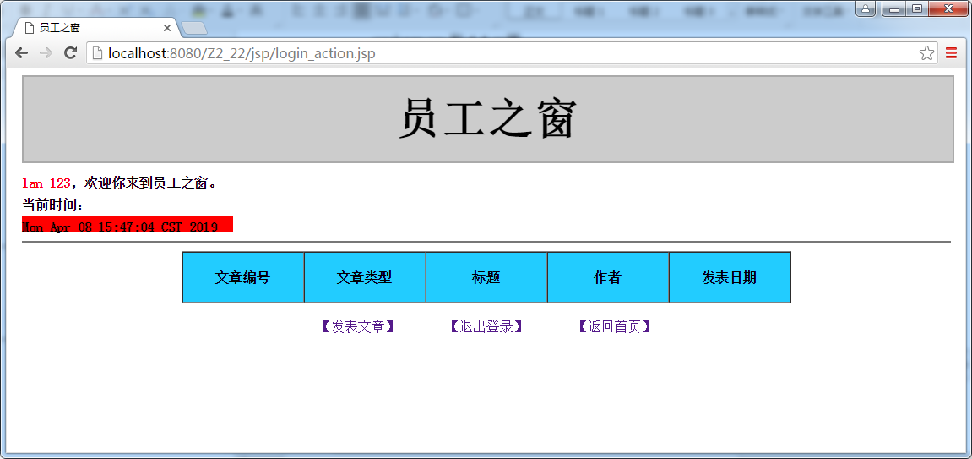
效果图如下: