
※ettercap抓取FTP登录账号和密码
实验环境:
【FTP客户端】 【FTP服务器】
(Win7或CentOS) (rhel6.0)
192.168.57.65 192.168.112.128
【中间人】
(Kali2019.1a)
192.168.112.200
1.FTP服务器
虚拟机rhel6.0(192.168.112.128,root密码:123456)
已安装、配置、启动了FTP(vsftpd)服务
SecureCRT远程SSH登录到Linux
# rpm -qa | grep vsftpd
vsftpd-2.2.2-6.el6.i686
# vi /etc/vsftpd/vsftpd.conf
匿名用户anonymous,ftp
12 anonymous_enable=YES //默认允许匿名用户登录
27 anon_upload_enable=YES //上传权限
31 anon_mkdir_write_enable=YES //创建目录
添加:32 anon_other_write_enable=YES //删除、改名权限
33 anon_umask=022 //权限掩码
FTP服务器默认根目录:/var/ftp
drwxr-xrwx. 7 root root 4096 6月 19 11:35 pub
# mount /dev/cdrom /media
[root@wgxy ~]# cd /media/Packages/ //已自动挂载光盘到/media
[root@wgxy Packages]# rpm -ivh tree-1.5.3-2.el6.i686.rpm
warning: tree-1.5.3-2.el6.i686.rpm: Header V3 RSA/SHA256 Signature, key ID fd431d51: NOKEY
Preparing... ########################################### [100%]
1:tree ########################################### [100%]
[root@wgxy Packages]# cd /var/ftp
[root@wgxy ftp]# ll
总用量 4
drwxr-xrwx. 7 root root 4096 6月 19 11:35 pub
[root@wgxy ftp]# tree
.
└── pub
├── drivers
├── Linux-iso
├── mp3
├── picture
├── p.txt
└── software
6 directories, 1 file
# service vsftpd start //启动vsftpd服务
# chkconfig vsftpd on //设置开机自动启动
# chkconfig --list vsftpd
vsftpd 0:关闭 1:关闭 2:启用 3:启用 4:启用 5:启用 6:关闭
# service vsftpd status //检查vsftpd服务状态
vsftpd (pid 1629) 正在运行...
2.FTP客户端
物理机Win7
Windows命令提示符:C:>ftp 192.168.112.128
CentOS
# ftp 192.168.112.128
3.验证FTP客户端登录FTP服务器
物理机Win7登录FTP服务器(Linux)
C:\Users\tsg>ftp 192.168.112.128
连接到 192.168.112.128。
220 娆㈣繋鐧诲綍鍒扮綉缁?8绾х殑FTP鏈嶅姟鍣紒
用户(192.168.112.128:(none)): ftp
331 Please specify the password.
密码:
230 Login successful.
ftp>
ftp> help
命令可能是缩写的。 命令为:
! delete literal prompt send
? debug ls put status
append dir mdelete pwd trace
ascii disconnect mdir quit type
bell get mget quote user
binary glob mkdir recv verbose
bye hash mls remotehelp
cd help mput rename
close lcd open rmdir
ftp>
ftp> pwd
257 "/"
ftp> ls
200 PORT command successful. Consider using PASV.
150 Here comes the directory listing.
pub
226 Directory send OK.
ftp: 收到 5 字节,用时 0.00秒 2.50千字节/秒。
ftp> ls -l
200 PORT command successful. Consider using PASV.
150 Here comes the directory listing.
drwxr-xrwx 7 0 0 4096 Jun 19 03:35 pub
226 Directory send OK.
ftp: 收到 61 字节,用时 0.00秒 61.00千字节/秒。
ftp> cd pub
250 Directory successfully changed.
ftp> ls
200 PORT command successful. Consider using PASV.
150 Here comes the directory listing.
Linux-iso
drivers
mp3
p.txt
picture
software
226 Directory send OK.
ftp: 收到 51 字节,用时 0.00秒 12.75千字节/秒。
ftp> ls -l
200 PORT command successful. Consider using PASV.
150 Here comes the directory listing.
drwxr-xr-x 2 0 0 4096 Jun 19 03:34 Linux-iso
drwxr-xr-x 2 0 0 4096 Jun 19 03:35 drivers
drwxr-xr-x 2 0 0 4096 Jun 19 03:35 mp3
-rw------- 1 14 50 1883 Jun 19 03:23 p.txt
drwxr-xr-x 2 0 0 4096 Jun 19 03:35 picture
drwxr-xr-x 2 0 0 4096 Jun 19 03:35 software
226 Directory send OK.
ftp: 收到 387 字节,用时 0.00秒 96.75千字节/秒。
ftp>
4.中间人(Kali)
用Xshell远程SSH登录Kali
见“第1周/1.安装Kali黑客操作系统及相关实战(2019.09.05).doc”
(1)初始化ettercap
root@kali:~# ettercap -G
(2)选择Sniff→Unified sniffing…→选择网卡
抓包,嗅探
(3)选择Hosts→Scan for hosts
生成主机列表
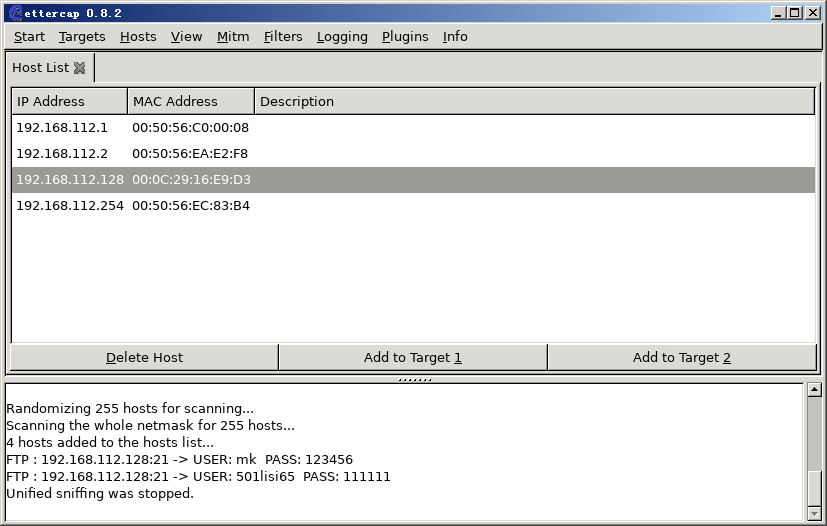
(4)选择Hosts→Hosts list
点开主机列表,查看被扫描的主机
(5)在FTP客户端登录FTP服务器
(6)kali查看
有用户登录192.168.112.128主机的FTP服务器了。
其用户名为501lisi65,密码为111111。
(见“实验项目1结果截图1.png”)
(7)选择Start→Stop sniffing
获取这些信息后停止嗅探
(8)选择Mitm→Stop mitm attack(s)
停止中间人攻击
练习:
1.telnet
2.http
arp协议安全攻防
ARP协议安全攻防.txt
3.arpspoof
防御密码嗅探-使用arpspoof实施中间人攻击并抓取密码.pdf

