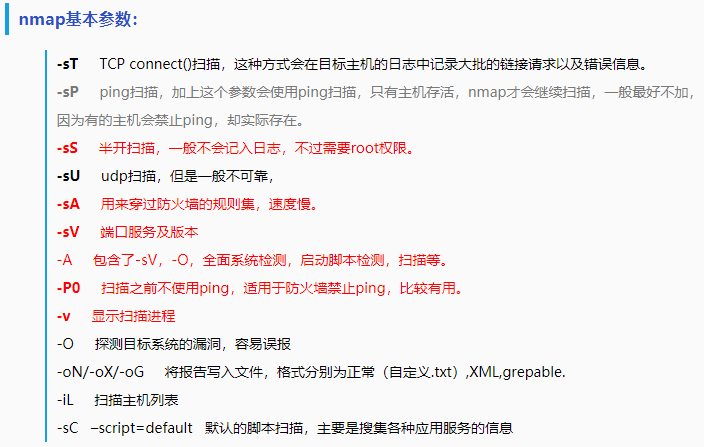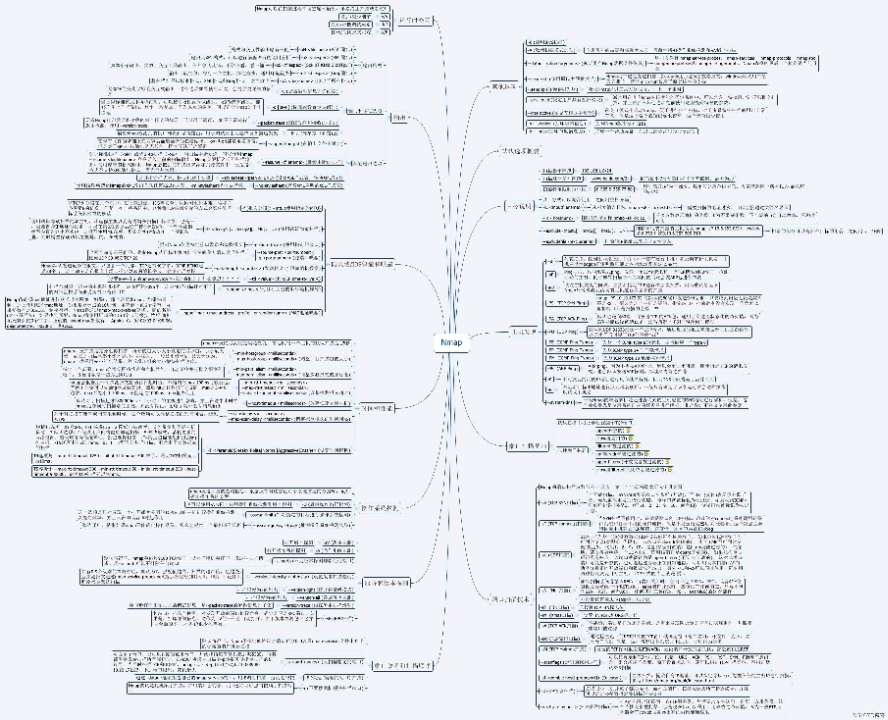
1.Nmap的语法
# nmap [scan Typy(s)] [Options] {target specification}
“scan Type(s)”用于指定扫描类型,
“Options”用于指定选项,
“target specification”用于指定扫描目标
必须给出扫描目标参数,可以是单一主机,也可以是一个子网:
192.168.112.*
192.168.0-255.0-255
192.168.0.0/16
2.Nmap的例子
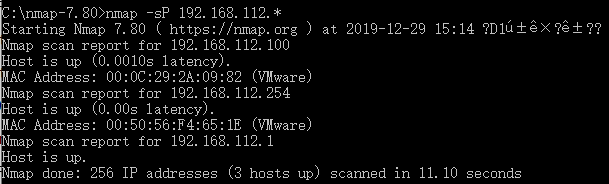
例1:使用Nmap的Ping扫描技术探测网络192.168.112.*中正在运行的主机。
Kali下:
# nmap -sP 192.168.112.*
Nmap scan report for 192.168.112.100
Host is up
Mac address: 00:0C:29:2A:09:82 (VMware)
Nmap scan report for 192.168.112.254
Host is up
……
以下Nmap命令和截图,以“nmap-7.80-win32.zip”解压到Win7的C:\map-7.80\nmap.exe为例:
C:\map-7.80>nmap -sP 192.168.112.*
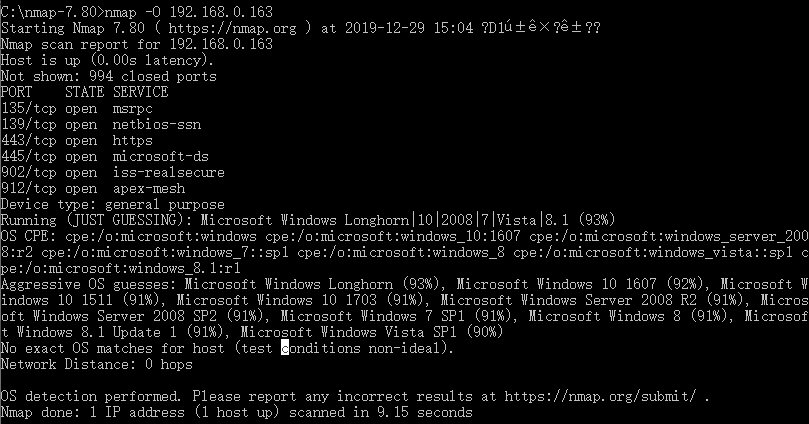
例2:使用Nmap进行操作系统扫描渗透测试。
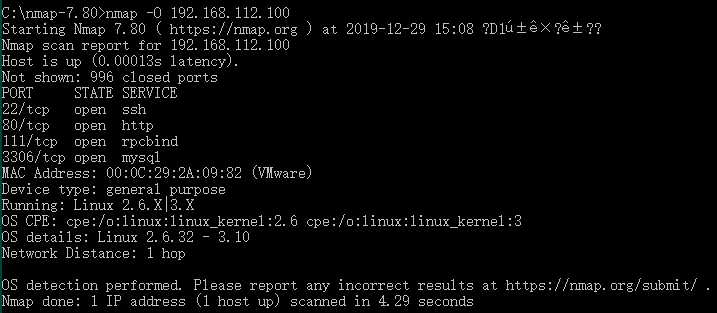
C:\nmap-7.80>nmap -O 192.168.112.100
PORT STATE SERVICE
21/tcp open ftp
22/tcp open ssh
23/tcp open telnet
80/tcp open http
111/tcp open rpcbind
443/tcp open https
445/tcp open file share
3306/tcp open mysql
Mac address: 00:0C:29:2A:09:82 (VMware)
OS details: Linux 2.6.32 - 3.10
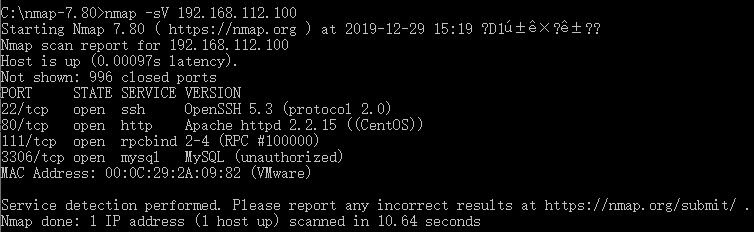
例3:使用Nmap进行系统服务及版本号扫描渗透测试。
C:\nmap-7.80>nmap -sV 192.168.112.100
PORT STATE SERVICE VERSION
21/tcp open ftp vsftpd 2.0.5
22/tcp open ssh OpenSSH 5.3 (protocol 2.0)
80/tcp open http Apache httpd 2.2.15 ((CentOS))
3306/tcp open mysql MySQL 5.0.95
# nmap -sV 192.168.112.100 -p T:80
PORT STATE SERVICE VERSION
80/tcp open http Apache httpd 2.2.15 ((CentOS))
例4:使用Zenmap GUI进行端口扫描渗透测试。
nmap -T4 -A -v 192.168.112.100
以Winows命令提示符为例:
C:map-7.80>nmap -T4 -A -v 192.168.112.100
Starting Nmap 7.80 ( https://nmap.org ) at 2019-12-29 15:29 ?D1ú±ê×?ê±??
NSE: Loaded 151 scripts for scanning.
NSE: Script Pre-scanning.
Initiating NSE at 15:30
Completed NSE at 15:30, 0.00s elapsed
Initiating NSE at 15:30
Completed NSE at 15:30, 0.00s elapsed
Initiating NSE at 15:30
Completed NSE at 15:30, 0.00s elapsed
Initiating ARP Ping Scan at 15:30
Scanning 192.168.112.100 [1 port]
Completed ARP Ping Scan at 15:30, 1.28s elapsed (1 total hosts)
Initiating Parallel DNS resolution of 1 host. at 15:30
Completed Parallel DNS resolution of 1 host. at 15:30, 0.02s elapsed
Initiating SYN Stealth Scan at 15:30
Scanning 192.168.112.100 [1000 ports]
Discovered open port 3306/tcp on 192.168.112.100
Discovered open port 80/tcp on 192.168.112.100
Discovered open port 22/tcp on 192.168.112.100
Discovered open port 111/tcp on 192.168.112.100
Completed SYN Stealth Scan at 15:30, 0.06s elapsed (1000 total ports)
Initiating Service scan at 15:30
Scanning 4 services on 192.168.112.100
Completed Service scan at 15:30, 6.01s elapsed (4 services on 1 host)
Initiating OS detection (try #1) against 192.168.112.100
NSE: Script scanning 192.168.112.100.
Initiating NSE at 15:30
Completed NSE at 15:30, 0.34s elapsed
Initiating NSE at 15:30
Completed NSE at 15:30, 0.02s elapsed
Initiating NSE at 15:30
Completed NSE at 15:30, 0.00s elapsed
Nmap scan report for 192.168.112.100
Host is up (0.00s latency).
Not shown: 996 closed ports
PORT STATE SERVICE VERSION
22/tcp open ssh OpenSSH 5.3 (protocol 2.0)
| ssh-hostkey:
| 1024 ae:88:ef:99:21:f5:0d:f6:c2:e3:21:a6:a4:b2:ec:c3 (DSA)
|_ 2048 bc:ae:f6:62:6d:4f:d6:9f:a6:97:c9:23:52:73:56:19 (RSA)
80/tcp open http Apache httpd 2.2.15 ((CentOS))
| http-methods:
| Supported Methods: GET HEAD POST OPTIONS TRACE
|_ Potentially risky methods: TRACE
|_http-server-header: Apache/2.2.15 (CentOS)
|_http-title: Apache HTTP Server Test Page powered by CentOS
111/tcp open rpcbind 2-4 (RPC #100000)
| rpcinfo:
| program version port/proto service
| 100000 2,3,4 111/tcp rpcbind
| 100000 2,3,4 111/udp rpcbind
| 100000 3,4 111/tcp6 rpcbind
| 100000 3,4 111/udp6 rpcbind
| 100024 1 33946/tcp6 status
| 100024 1 37257/tcp status
| 100024 1 39090/udp6 status
|_ 100024 1 44463/udp status
3306/tcp open mysql MySQL (unauthorized)
MAC Address: 00:0C:29:2A:09:82 (VMware)
Device type: general purpose
Running: Linux 2.6.X|3.X
OS CPE: cpe:/o:linux:linux_kernel:2.6 cpe:/o:linux:linux_kernel:3
OS details: Linux 2.6.32 - 3.10
Uptime guess: 0.013 days (since Sun Dec 29 15:11:46 2019)
Network Distance: 1 hop
TCP Sequence Prediction: Difficulty=256 (Good luck!)
IP ID Sequence Generation: All zeros
TRACEROUTE
HOP RTT ADDRESS
1 0.00 ms 192.168.112.100
NSE: Script Post-scanning.
Initiating NSE at 15:30
Completed NSE at 15:30, 0.00s elapsed
Initiating NSE at 15:30
Completed NSE at 15:30, 0.00s elapsed
Initiating NSE at 15:30
Completed NSE at 15:30, 0.00s elapsed
Read data files from: C:map-7.80
OS and Service detection performed. Please report any incorrect results at https://nmap.org/submit/ .
Nmap done: 1 IP address (1 host up) scanned in 13.54 seconds
Raw packets sent: 1023 (45.806KB) | Rcvd: 1016 (41.338KB)
Nmap优缺点
优点:
Nmap作为主动式端口扫描工具,只要在对方没有把通信阻断的情况下,可以在较短的时间内获得结果。
缺点:
(1)现在带有阻断功能的防火墙越来越多,有些防火墙当检测到端口扫描时,会将端口关闭一定的时间,还有的机器使用了很多filter功能,只对特定的IP地址提供服务,这种情况下,主动式的正确性大打折扣。
(2)主动式只是在一瞬间对端口进行扫描,只有当服务器那个时候使用的服务才有可能被侦测到。
(3)端口扫描是一种广义上的攻击行为,对于末经许可的机器,一般不能施行。